Monday, December 12, 2016

Accessibility is Everything


 Dylan's Voice https://youtu.be/oMN2PeFama0

At the wonderful FCIS (Florida Conference of Independent Schools) conference, many of our faculty were able to attend one of the best learning events I have ever witnessed, 3 amazing hours with Luis Perez, Apple Distinguished Educator and accessibility evangelist. Luis is one of those rare educators who has the knack of making everything he speaks about relatable. You cannot leave one of his workshops without feeling that it is  imperative for you to implement and educate your students and parents on accessibility features. Apple, of course, is the king of accessibility. It is part of their DNA and Luis showed us over 3 hours just how important these accessibility features are to learning. It is all about equity not equality. After the conference, I had a chance to read Luis's book, Zoom In. While this book is intended for teachers who may work with students with low vision, I found it to be a tremendous inspiration to use with all students. In Zoom In, you will find a wealth of material that will change our perspective on how you present everything. I highly recommend reading it and rethinking everything from how you write on the board, to classroom decorations to handouts and presentations. It is truly an opening book. At NBPS, we have a school within our school called Lighthouse Point Academy, for students with mild to moderate learning disabilities. We also have about 350 students from around the world who speak over 42 different languages. So accessibility is a game changer for us. I thought our August PD addressed this area, but Luis's session was so powerful. It was truly his influence which inspired our faculty to really pay attention to this issue and I cannot thank him enough.
From the FCIS program with my highlights :)


Several months prior, we had once again included an overview of the accessibilty features available on the iPad and on our Mac computers. We crammed a lot into 45 minutes but what we did differently this year is that we also met one on one with every student and parent as part of our iPad distribution over the summer. Each appointment was about an hour where most of that time was dedicated to showing off these accessibility features. Parents are our partners in learning so it made perfect sense to include them in this communication. During these appointments we mainly focused on three areas of iPad accessibility: read to me feature, dictation and visibility. Parents were amazed to see that they could use these features on their iPhones as well. It was a win win situation for all. 


Tuesday, November 29, 2016

It's The Most Wonderful Time of the Year!


It’s the most wonderful time of the year! The Hour of Code (aka Computer Science Week) is upon us beginning Monday, December 5th! Do you know that there are currently over 500,000 computing jobs open in the US? Do you know that computing jobs are the #1 source of new wages in the United States? Do you know that while a college graduate may earn $1.19M over a lifetime, a college grad with a computer science major may earn 40% MORE ($1.67M). Yet, the US only graduated 42,969 computer science students last year.
 

Watch this global view: http://www.apple.com/education/everyone-can-code/

We will be celebrating all week long as usual but our resources have become super wonderful – the code.org site is up to 180 resources but it is SMART searchable so that you can search for coding fun by what your coding comfort level is at or the time you want to spend or age level or by device or by content!

Go to: https://code.org/learn


You may also want to check out our NBPS Hour of Code page which includes sources in addition to code.org https://sites.google.com/a/mynbps.org/technology/hour-of-code

We will be screening videos, including documentaries, Debugging the Gender Gap, The Art of Creative Coding and Code Girl, during lunch in the Student Union. If you would like to see the incredible wealth of short videos on Code.org go to https://code.org/educate/resources/videos

Apple is hosting free coding workshops at its stores – sign up here: http://www.apple.com/retail/code/

Apple has an “Everyone Can Code” site that includes free teacher guide (especially on the fab new Swift Playgrounds).

Tuesday, October 27, 2015

Two Apps Are Better Than One!


My two favorite apps of all time are Book Creator and Explain Everything – you can create ANYTHING between these two apps and they really soar when smashed together! I love that both of these developers listen so closely to teacher suggestions and are constantly seeking to improve their apps.  We use Book Creator in a myriad of ways including Digital Portfolios in K-2, to create books (fiction and nonfiction) across our campus, and a Virtual Notebook in AP Human Geography. There are lots of options and since the updated Book Creator app now offers comic strips as an option, your creations are limited only by your imagination. 

Explain Everything is the ultimate class flipping tool but also a great way to annotate web pages live or capture students mathematical thinking as it happens. We love taking the Explain Everything iAssessments in math and putting them in our ePortfolios in PK-2.  Terry Condon  uses Explain Everything for poetry annotation and reflection which they upload as a movie. What a fabulous way for students to document their learning! Imagine pulling all of those annotations in one Book Creator book to share with the class (or beyond!).

Reshan Richards is the co-creator of Explain Everything and he has teamed up with the Book Creator developers to suggest 4 powerful ways to demonstrate student learning whether PreK or high school.

Check it out at http://explaineverything.com/news/exporting-pdf-book-creator-annotate-explain-everything/

P.S. If you want to add a dash of Green Screen Doink app to the mix, you can really have some fun!

Let me know if you have any questions, want a tutorial or would like to see some samples.

Happy learning!

Wednesday, June 24, 2015

#ISTE2015 Before During After - the 411 So You Don't 911

 via https://www.flickr.com/photos/barkbud/4257136773

ISTE is BIG. It's easy to get overwhelmed.  

Here are my tips for newbies on the PRE-DURING-POST ISTE Experience:


Pre-ISTE - getting to ISTE early is worth it!
  • HACK ED 15 Event Saturday, June 27th, 2015 from 8:00am - 4:00pm at the Pennsylvania Convention Center (113BC) use hashtags: #hacked15 or #hackeducation Expand your brain - great ideas and conversations all day long organized by great brains like @AudreyWatters and @SteveHargadon - you don't have to go all day (especially if you are going to our iPad workshop - see shameless self promotion below) See ISTE Unplugged http://www.isteunplugged.com/sat-627-hack-education.html
  • Digital Storytelling with iPad, Book Creator and Green Screen Doink App (WHO25) 6/27 12:30 to 3:30 pre-conference workshop (self promotion I know but it will be hands-on fabulousness!)
  • The Hack Education After-Party - Saturday, June 27, 2015 from 7:00 PM to 9:00 PM  Philadelphia Marriott Downtown- Grand Ballroom D FUN*FUN*FUN
  • Invent To Learn Day of Hard Fun @ISTE 2015 http://www.inventtolearn.com/iste/ I went before #ISTE2013 and had a blast and learned so much from @garystager and @smartinez

  • Global Education Day Sunday, June 28th, 2-5pm
    Pennsylvania Convention Center - Room 103B/C. Another great ISTE Unplugged event!
    Register: http://www.eventbrite.com/e/global-education-day-at-iste2015-registration-16556665432
  • Independent Educators Dinner (hopefully you signed up already - if not contact @vvrotny but it may be too late) Sunday night - can't wait to meet up with all the big brains that contribut to the weekly #isedchat every Thursday night :)
  • ISTE Communities - consider joining one or more of the ISTE communities - it's a great way to make connections in an area of interest.


During ISTE- My Top 10
  1. dress comfortably in layers - some rooms will be cold, others hot-for goodness sake - forget style - wear comfy shoes - you will walk miles
  2. bring your chargers
  3. bring lots of business cards with you to drop in all the raffle drawings you will come across in the exhibition hall - if you don't have cards - create labels (even better) that have your information - it will save you oodles of time
  4. have a plan! scope out the program ahead of time - if you are going with a group consider using a google doc or evernote to organize and share information - know who you want to see in the exhibition hall too - it can be really overwhelming if you don't know your "musts" ahead of time
  5. visit the Blogger's Cafe - great minds there - usually veteran ISTE attendees who can give you lots of tips
  6. Take a water bottle with you and a couple of snacks - sometimes you get so busy you forget to eat
  7. Visit Philly! It's a great city with so much to see!
  8. Talk to people - it's the conversations around the hallways that can really elevate your learning experience - make connections-get on Twitter - ask others for their handles-download the @Tweechme app
  9. Try not to carry too much with you! It's tempting to pick up everything you see in the Exhibition Hall but sometimes a few snapshots on your phone can really tell the story just as well. 
  10. Be open. Be curious. Have fun.

Post ISTE
  1. Stay in touch with connections you made. Review the #ISTE2015 and #ISTE15 hash tags for things you might have missed.
  2. Read over your notes and try to summarize while fresh in your head.
  3. Think about how you can best share this information with your school community - think about creating those presentations during the summer before the school year approaches - make it a priority. 
  4. Prepare for next year!


Monday, June 1, 2015

Book Creator - The Swiss Army Knife of Apps


Book Creator is am amazing app. It is incredibly versatile much as the famed Swiss Army Knife. You can use Book Creator to create a single student story, a collaborative book, a reflective journal, a science notebook and so much more. Book Creator plays well with others so it is a snap to insert voice, music, drawings (we love Doodle Buddy for this), photos, video, Explain Everything, text, Tellagami and other animations to make your book come to life. Best of all, you can upload the Book to the iBooks store or share as a movie.

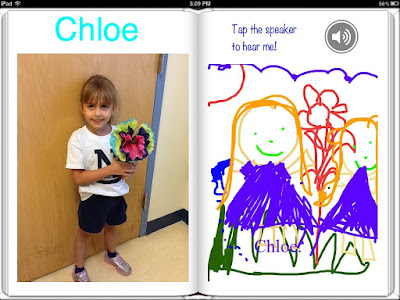
Here's an example of a Mother's Day class book. Each student took a photo of his or her best handwritten Mother's Day Poem, a photo of themselves, an audio recording reading the poem, a Doodle Buddy portrait of mother and child and a recording of a heartfelt message to mom. Simple to pull in those two pages from each student and a true treasure for any mother. It captures the student's handwriting, message, art work and a lovely photo of the child. I have a dozen large red boxes filled with my children's construction paper projects, art work, etc. but I would kill to go back in time and capture their voice and thoughts about the project at that time. Book Creator makes this process easy. 


Which brings me to my next favorite use, a reflective journal. We use Book Creator as our ePortfolio from PreK through 2nd grade. Our students have always used their portfolios at the end of the year student led parent conference but it's difficult for the little ones to remember why a certain project meant so much or what they learned from it. We still maintain all of their work done by hand but now we put it into a continual Book Creator book and record their reflection at that time. All of these projects get loaded into their ePortfolio Google Site which follows them through 12th grade. What an amazing documentation of their learning over time! 


We've also had teachers use Book Creator for nonfiction reports like our State Fair books in 3rd grade. Students love that there is no creative ceiling. They can insert license free images from the web, their own art work, all of their proofed text and then add clever placement, voice recordings, state songs and video to make their books come alive. So very different from our old big poster project. 

We love that Book Creator lets us "app smash" with our other core apps such as Explain Everything, Doodle Buddy and iMovie. Out students love using Book Creator during their free time as well. Just the other day, two boys brought in their some of their toy figures including Darth Vadar, Batman and several variations of GI Joe. They used Stop Motion Animation and created a book from a spur of the moment story imagining how their toys would interact with each other.

Give Book Creator a try today. It works for any curricular area, any grade level. You are only limited by your imagination as this app IS the Swiss Army Knife app.